
The short version
- Before each sale, list the families who won’t be back.
- Hand each of their customers to a family just starting out, ideally one close by.
- Give the new family a heads-up and a script, so the first knock is a warm one.
Why customers get left behind
A family’s customer list usually lives in their heads, a notebook, or last year’s order forms. When the family leaves, the list goes with them, and the customers are left behind. The neighbor who bought two discount cards every fall never gets asked again. Nobody meant to lose them. It just happens.
Those customers are the easiest sales your group will ever make. They already said yes. Someone just has to knock.
What to do
- 1.Make the list. At wrap-up, or before the next sale opens, write down the families who won’t be back.
- 2.Find their customers. Who bought from them, what they bought, and where they live.
- 3.Match by neighborhood. A family on the same street is a natural fit. Kids sell best close to home.
- 4.Spread them out. Give a few extra doors to families who sold less last year. It can help a family that’s stretched thin.
- 5.Give the new family a heads-up. Tell them who they’re getting and what each customer bought last time.
- 6.Check at the halfway mark. See whether those customers have ordered, and nudge if they haven’t.
Copy this
To the new family
Good news! The [old family] family has moved on, and [Customer] bought [what they bought] from them last year. [Customer] lives near you, so they’re yours now. A quick knock from [seller] should do it!
For the seller at the door
Hi! I’m [seller] from [group]. [Old seller] used to sell to you, and they’ve graduated. Can I get your order this year?
A quick example
A football team had eight seniors graduate. Between them, they sold discount cards to 34 households. The coordinator handed those 34 to families just starting out who live nearby, about four each. That fall, 25 of the 34 bought again. At two cards apiece, that’s 50 cards the team would have lost.
How The Order Buddy handles it
On paper, you may never know who a family’s customers were. In The Order Buddy, every customer your families sold to stays on your group’s customer list.
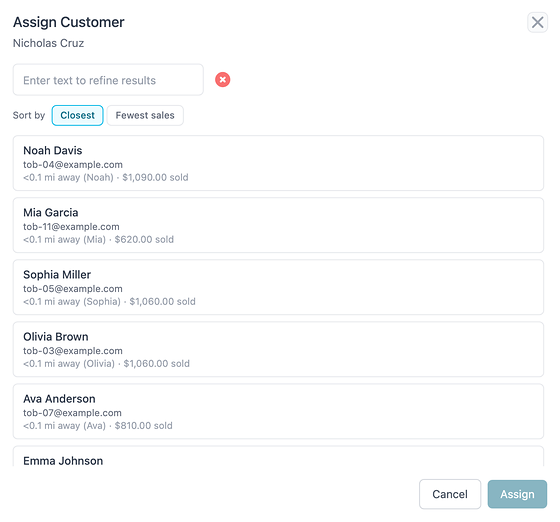
From the Unsold Customers list, tap Assign next to any customer. You’ll see your families sorted by who lives closest, or by who has the fewest sales, so you can keep it neighborly or give a family a lift. Pick one, and that customer moves to their list right away, with an Add order button beside the name.
After each sale, Insights also lists your lapsed customers (people who bought before but not this time), sorted by how much they spent, with a link to assign them to sellers.
What it won’t do is move a whole family’s list in one go. You assign one customer at a time, which is also how each one gets to the right door.
Want to see it on your own sale? , or read straight answers on how it works.
Your checklist
- Families who won’t be back, listed
- Each of their customers handed to a family just starting out, nearby
- New families told who they’re getting
- Handed-off customers checked at the halfway mark