
The short version
- Put one page on your website, next to your kit: how to start a sale, the final order, delivery, and a link to your FAQs.
- Say who calls who to set the delivery, and what your products need that day: cold, heavy or messy.
- Ask the group to count each product at the drop. Mix-ups are rare, but they happen.
Why one page helps
Each new coordinator asks the same things: How do we start? When is the final order due? Who sets the delivery day? Do we need a freezer? The answers usually live in an email thread, or in your head.
What to put on your page
- 1.How to start a sale. What you sell, the prices, your fundraiser kit, and how to sign up with you. Link your FAQs here too.
- 2.What to expect while it runs. When you’ll check in, and who to call with a question.
- 3.What you need with the final order. The date, the format (a total for each product), how much wiggle room you have after the date, and how you get paid.
- 4.How delivery works. Pickup or delivery, how far you go, and who calls who to set the day and time.
- 5.How to handle your products. If they’re cold or frozen, say how long they can sit out and what to bring. If they’re heavy, say what a case weighs and how many hands to plan for. If they’re messy, say what to keep upright.
- 6.Ask for a count at the drop. Your driver may have several stops that day, so a mix-up can happen: one product short, another extra. Ask the group to count each product against the final order before the driver leaves, and say who to call if something’s off.
Copy this
Once your final order is in, [we’ll call you within two business days] to set your delivery day and time. Please have [three or four] adults ready to unload, and count each product before our driver leaves.
Our [cookie dough] is frozen. It can be out of the freezer for about [two hours], so plan to hand it out right away, or bring coolers. A case weighs about [20 pounds].
A quick example
A cookie dough maker put a page like this on its website before the fall season. A high school choir’s coordinator read it in five minutes. When the maker called to set the delivery, she was ready. She had coolers, since the dough could only be out for two hours, and four parents to unload. At the drop, the choir counted every flavor and found an extra case of chocolate chip that belonged to the next stop. The driver sorted it out before he left.
How The Order Buddy handles it
With The Order Buddy, your delivery details live with each sale. On your Fulfillment page, you set pickup or delivery, the date and time, and the delivery address for each group’s sale. The coordinator sees them in their sale’s settings, any time they look.
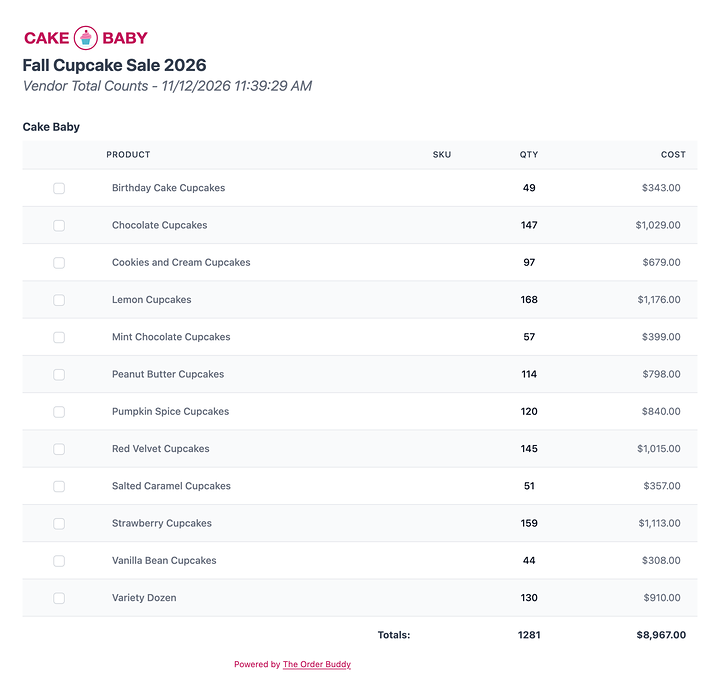
At the drop, the group’s product counts report lists every product and how many, so the count takes minutes. On your own site, it carries your logo, with “Powered by The Order Buddy” at the bottom.
Want to see it with your own products? Try it free with one of your groups.
Your checklist
- How to start a sale, with your FAQs linked
- What to expect while it runs, and who to call
- What you need with the final order, the wiggle room after the date, and how you get paid
- How delivery works, and who calls who
- How to handle your products: cold, heavy or messy
- A count at the drop, and who to call if it’s off
All 4 parts for suppliers
- 1.Help your groups beyond the product
- 2.Put your whole fundraiser on one page
- 3.See what sells in real time (coming soon)
- 4.Grow your groups year over year (coming soon)