
The short version
- Hold the kickoff meeting. Products, prices, deadlines and people change every year.
- Give every handout one home online, and send families one link to it.
- When something changes, fix it in that one place first, then tell families.
Why the handouts are the hard part
Every year something changes: new products, new prices, a deadline that moved, a new coordinator, a pickup spot that isn’t settled yet. The meeting covers it. But not every family makes it. Maybe the handouts get emailed, and then nobody can find the email with the attachments.
And if there are printouts, someone has to set the prices on them. It’s very common for those to be wrong, or to need an update a week later.
Give your handouts one home
Most groups already have a place online that families check: the school or district website, your team’s scheduling app, the troop’s or church’s website, or a shared folder. Pick one, and put everything there: the order form, the price list, the dates and the pickup plan.
What to do
- 1.Set up the home before the meeting. Then you can say “it’s all at this link.”
- 2.Cover what changed at the meeting. Products, prices, deadlines, who’s coordinating, and pickup, even if it’s still “coming soon.”
- 3.Send one message to every family, including the ones who missed it: the dates, the goal and the link.
- 4.Check printed prices against your supplier before anything goes out.
- 5.When something changes, fix it in the one home first. Then send a short note. Never a second version in a new email.
Copy this
The one kickoff message
Our [product] sale runs [open day] to [close day] at [time]. Each seller’s goal is [goal]. Everything you need is here: [link]. That’s the order form, prices, dates and pickup details. Questions? Ask [name] at [phone].
When something changes
Quick update: [what changed]. The new [form or details] is at the same link: [link]. Thanks!
A quick example
A church youth group held its kickoff on a Sunday after service, and half the families made it. The wreath prices had gone up a dollar since the forms were printed. So the coordinator fixed the form on the church’s website, and sent one note that night: “New form, same link.” When the pickup spot was settled two weeks later, it went in the same place.
How The Order Buddy handles it
With The Order Buddy, that one home is built in. You send families one link to register for the sale, and the forms you upload are right there with it, where every family can open them, including the ones who missed the meeting.
If a price changes, you change it in your products, and the next order uses it. Once the pickup spot is settled, you add it to the event, and families see it the next time they log in.
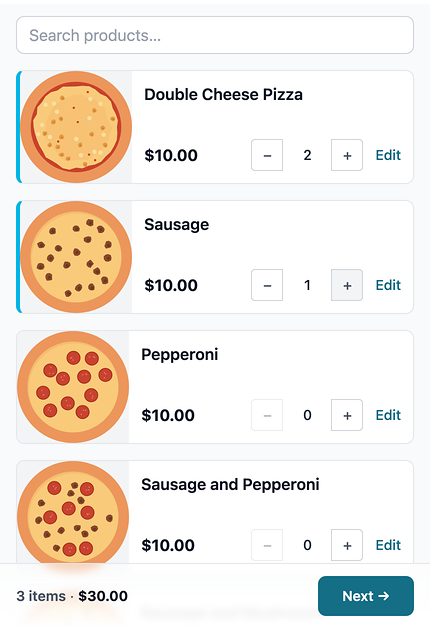
And every order they enter is there for you right away, so by the halfway mark you can see who has started and who hasn’t.
What it won’t do is send the update for you. When something changes, a quick note still helps.
Want to see it on your own sale? , or read straight answers on how it works.
Your checklist
- Kickoff meeting held: what changed, dates, goal
- Every handout in one home online, with one link
- One message sent to every family, with the link
- Printed prices checked against the supplier
- Changes fixed in the one home first, then a short note
All nine steps
- 1.Set three dates, and treat the close as a hard stop
- 2.Pick one coordinator, and make it obvious who it is
- 3.Give every seller a goal they can see
- 4.Kick off with one meeting and one link
- 5.Decide how you’ll take payment, and say it once
- 6.Check in at the halfway mark
- 7.Close on time and send one clean supplier order
- 8.Make pickup day boring
- 9.Wrap up and hand next year a head start