
The short version
- Ask your supplier when the order is due, and close your sale a few days before that.
- Decide what happens to late orders, and tell families up front.
- Count by product, check it against the money, and send one order. Get it confirmed.
Before the sale opens, ask your supplier five things
Every supplier runs their side a little differently. One wants an email two weeks before delivery. Another wants an online form the Monday before. Some ship only in full cases. Find out now, while it’s easy.
- 1.When is the order due? Close your sale two or three days before that. You need time to count.
- 2.How do they want it? Email, an online form or their spreadsheet. Usually it’s totals by product, not by seller.
- 3.Do they ship in full cases? If so, how many to a case? You’ll round up, so plan for extras.
- 4.What happens to a late order? Some suppliers let you add until the truck is loaded. Others don’t. After the deadline, a late order can mean a second order, a second delivery and an extra fee.
- 5.When and how do they get paid? Some want a check at delivery. Others send an invoice. Either way, count your money before the truck shows up.
On close day
- 1.Close when you said you would. Remind families two days before, and send a “we’re closed” note right after.
- 2.Clean up the list. Take out doubles, test orders and empty orders. Leave out donations. Your supplier doesn’t ship those.
- 3.Total by product. One line per product, one number each. Round up to full cases if your supplier needs it.
- 4.Check it against the money. Paid orders should match the cash, checks and Venmo in your hands. Anything unpaid is your list for pickup day.
- 5.Send it, and ask them to confirm. Ask for the quantities, the delivery date and the time back in writing. Keep that email.
Late orders: say no kindly, or say yes on purpose
Someone will always ask. Pick your rule before the sale opens, and put it in your kickoff message. If your supplier lets you add until a cutoff, take late orders until then. After that, fill them from your extras or say no. Don’t open a second order for two pizzas until you know what it costs.
Copy this
Two days before the close
Two days left! Orders close [day] at [time]. That’s a real deadline: our order goes to [supplier] the next morning. Thank you for everything you’ve sold!
Right after the close
We’re closed. Thank you! We sold [number] items. Pickup is [day] from [start] to [end] at [place]. Missed it? [Your late-order rule.]
To your supplier
Hi [name], here’s [group]’s order: [product: quantity, one per line]. Can you confirm the quantities and delivery on [date] at [time] to [address]? Thank you! [Your name, phone]
A quick example
A hockey team sold 137 pepperoni pizzas. Their supplier ships 12 to a case, so they ordered 144, and the seven extras covered the late orders that came in Sunday night. Their money came up $36 short: one check for three pizzas, still in a hockey bag. They found it, sent the order Monday morning, and had a confirmation by noon.
How The Order Buddy handles it
On paper, you can’t see a thing until the forms come back, and by then it’s too late to help anyone. With The Order Buddy, you see the whole sale while it’s still open. Every registered family is on your list with their orders and how close they are to their goal, including the families who haven’t entered a single order yet.
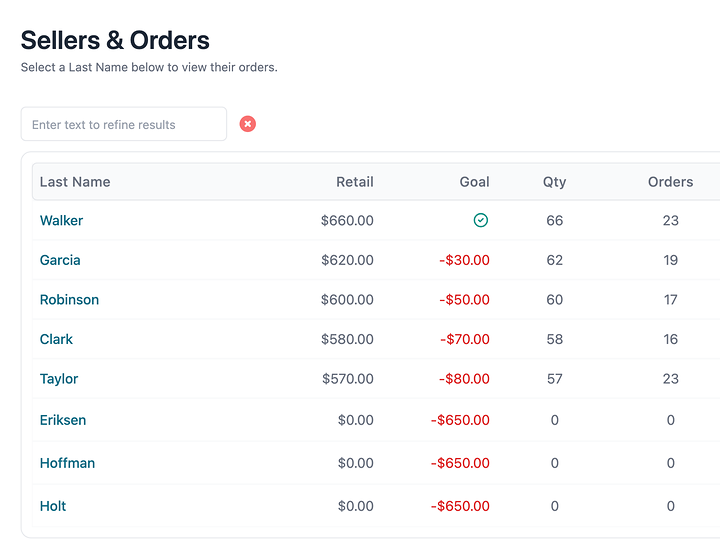
So days before the close, you know who could use a friendly reminder, and who’s trying hard but stretched thin and could use a hand. Families see how many days are left right on their dashboard, so “I didn’t know it ended Sunday” stops being a thing.
Families enter each order as they take it, so there’s nothing to collect and nothing to re-type. When your sale closes, families can’t add new orders. You still can, so a late order you agree to take lands with everything else.
At the close, your reports are ready: product counts grouped by supplier (that’s the order you send), a picklist for each family, and a seller summary you can download. Donations stay out of the counts. Every order shows how it was paid, or that it hasn’t been, so the money check takes minutes, not a whole evening.
After the sale, you can see how each product sold, year after year, so next year’s order starts from what your customers actually bought.
What it won’t do is send the order to your supplier. You still send it. You’ll just know it’s right.
Want to see it on your own sale? , or read straight answers on how it works.
Your checklist
- The five answers from your supplier, before the sale opens
- Close set two or three days before their deadline
- Reminder sent, then a “we’re closed” note
- Totals by product, checked against the money
- Order sent and confirmed in writing
All nine steps
- 1.Set three dates, and treat the close as a hard stop
- 2.Pick one coordinator, and make it obvious who it is
- 3.Give every seller a goal they can see
- 4.Kick off with one meeting and one link
- 5.Decide how you’ll take payment, and say it once
- 6.Check in at the halfway mark
- 7.Close on time and send one clean supplier order
- 8.Make pickup day boring
- 9.Wrap up and hand next year a head start